Answers to the most common questions about buying, watching, and receiving cards on Breaker Toolbox.
How joining a break works, and what the different formats mean.
A break is a box or case of sports cards opened live, with the cards divided up among everyone who bought into it. Instead of buying a sealed box yourself, you buy one team, one random slot, or a share of the whole thing, and watch the cards get pulled in real time on stream.
Browse the marketplace for a break that fits what you collect and your budget, then purchase a slot the same way you'd buy anything else online. Once you're in, you'll have access to the livestream when the breaker goes live, and your cards ship afterward.
Each listing states its format up front, so you'll always know what you're buying into before you check out.
A slot is the specific place you're buying into a break — usually a team, a division, or another pre-set grouping. You get whichever cards end up matching the slot you bought. For example, a 30-slot break might have one slot per MLB team; buying that team's slot means you get whatever cards come up for that team.
A multi-tier break gives every slot more than one guaranteed grouping — for example, one team from Tier 1, one from Tier 2, and one from Tier 3, all included with a single slot purchase. It's a way to spread variety across every buyer rather than each slot being tied to just one team or division.
A Rip & Ship is similar to a break, but instead of everyone buying a pre-set slot, you buy specific unopened cards or packs and watch the breaker open (“rip”) them live, then mail you the results. It's popular because you get to choose exactly what gets opened and watch it happen in real time, rather than waiting on a randomly assigned team.
Message them from their Clubhouse (their store page on Breaker Toolbox) rather than social media DMs — that keeps a record of the conversation, which matters if you ever need to reference it for a refund or shipping issue.
Yes — breakers have their own store pages where you can browse and purchase available products without waiting for a live event.
Refunds can be requested from the Orders screen, but approving them is up to the breaker who ran the event — they may approve a full or partial refund, or decline the request. If you're not able to reach a resolution with your breaker directly, contact support@djawn.com after you've attempted to work it out with them. See the Refund Policy for the full process.
Randomization happens automatically the moment the last spot in a randomized break is purchased — no action is required from the breaker. The randomized results are displayed on the break's Break Details page, and every buyer in the break receives a notification letting them know the break is now full.
Breaker Toolbox's randomization tool is fully tested. Breaker Toolbox has no input into, and gains nothing from, the outcome of any randomization — the algorithm is never adjusted to influence results, for any break, for any reason.
See the Randomization Policy for the short version.
Expired redemption cards are an occasional risk with older products. It's worth trying to redeem it directly with the manufacturer, as some will still honor expired redemptions — but neither the breaker nor Breaker Toolbox is able to guarantee or replace an expired redemption.
If your break was part of a livestream with multiple breaks back to back, the replay doesn't become playable until the entire livestream wraps — that's the “Processing” status you'll see in the meantime. Once it's ready, you'll be able to jump straight to your break using bookmarks in the video, so you won't need to scrub through the whole stream to find it.
How and when you're charged, and how your payment information is handled.
No — Breaker Toolbox doesn't charge buyers any platform fees. You pay the price the breaker has set (plus shipping, if applicable), the same as buying from any online store.
Payments are processed through Stripe or PayPal, depending on which the individual breaker has connected to their store — covering major credit and debit cards as well as PayPal balance and linked accounts.
You're charged at checkout when you purchase your slot, the same as any other online order.
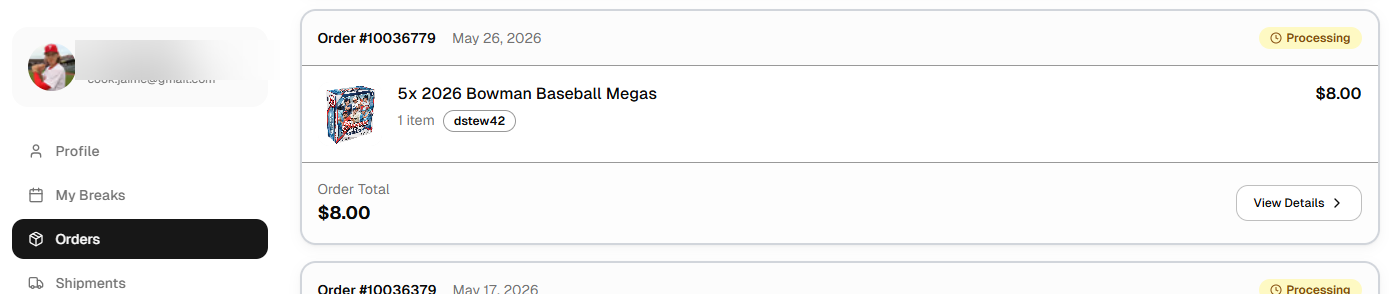
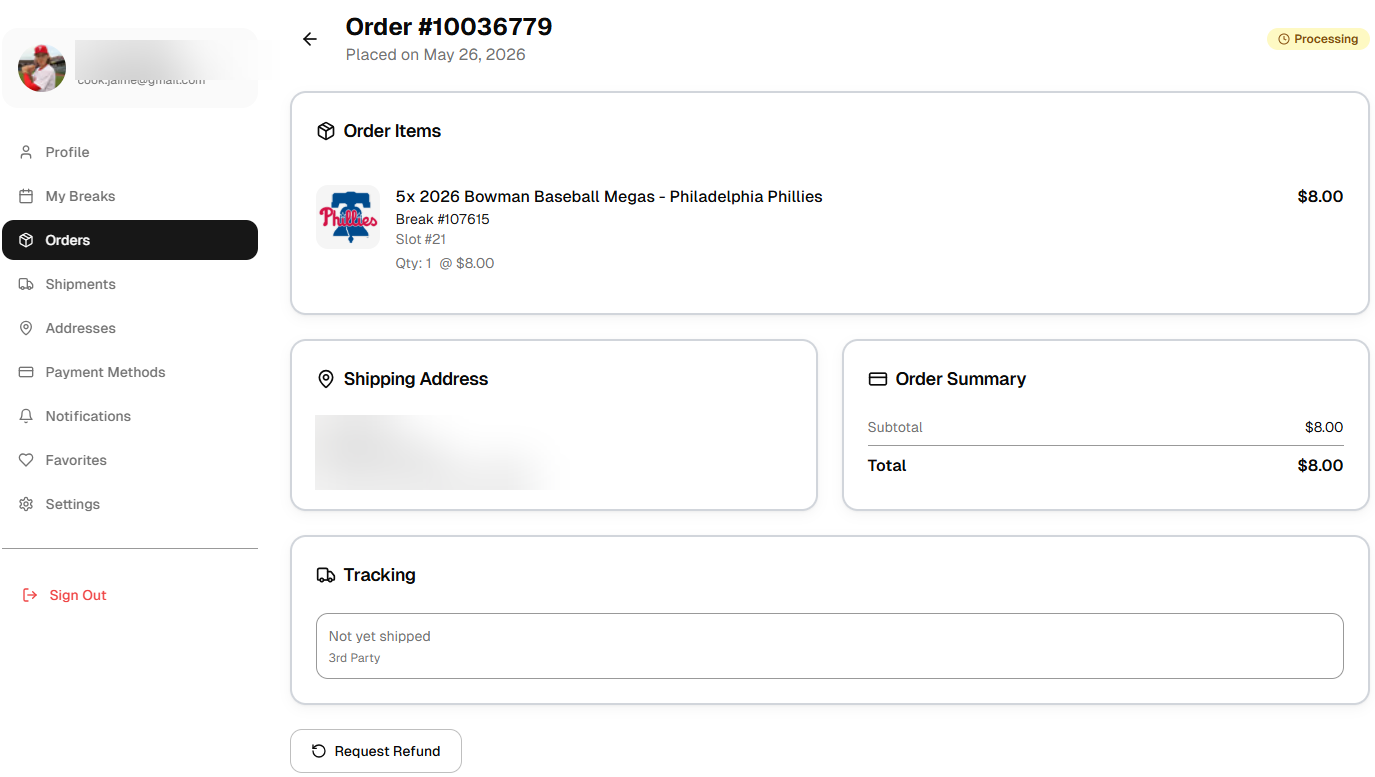
Refund requests are submitted on your order and are approved or declined by the breaker who ran the break. Full details, including how processing fees are handled, are in the Refund Policy.
To request a refund:
Payments are handled by established, PCI-compliant processors — Stripe and PayPal — so your full card details are never stored directly on Breaker Toolbox. See the Privacy Policy for more on how information is handled.
Check the error message shown next to the code field — it'll tell you exactly which of these applies:
What to expect after a break ends and your cards head your way.
Shipping cost is set by each individual breaker — some offer free shipping, others charge a flat fee. Check the break listing or the breaker's store page for their specific shipping details before you buy.
Shipping timelines are set by the individual breaker, since they're the ones packing and sending your order. Most breakers ship within a few business days of the break ending, and many offer a choice of standard, priority, or express shipping. Check the break listing or your breaker's store page for their specific timeline.
International shipping availability depends on the individual breaker. If you're outside the United States, check the break listing or message the breaker before purchasing to confirm availability, cost, and estimated delivery time. Customs fees and import duties, where applicable, are the buyer's responsibility.
Once your breaker ships your order, you'll get a tracking number, viewable from your account's order history.
Contact the breaker directly through the platform first — most issues are resolved quickly this way. If you're unable to reach a resolution, reach out to support@djawn.com and we'll help. See the Shipping Policy for more.
Managing your Breaker Toolbox account.
Sign up right on the site with an email address. You don't need any card-collecting background to create an account and start browsing or buying.
This only applies if you signed up with a custom email/password login. Use the “forgot password” link on the login screen to receive a reset email. If you signed in with Facebook, Apple, or Google, there's no separate Breaker Toolbox password to reset — manage your sign-in through that provider instead.
Yes — your login email can be updated any time from your Profile.
Nickname changes can be requested by emailing support@djawn.com.
You can delete your account directly from your Profile. See the “Deletion of User Data” section of the Privacy Policy for what deletion covers and alternate ways to request it.